2020年5月3日 星期日

安裝資訊插座

since: 2020/05/03 
update: 2020/05/03


reference:
1. How to Wire Keystone Jack 安裝資訊插座 - YouTube
2. 打線座 資訊插座 安全 網路佈線專業工程配件
3. 網路打線工具110 Punch Down Tool
4. 剝線刀 撥線刀 網路線撥線刀
5. 資訊插座 CAT.5e CAT6 Keystone Jack
6. 資訊面板 適用 CAT.5e CAT.6 資訊插座 RJ-11 網路面板 電話插座
7. Cat5e、Cat6、Cat6a和Cat7網線有什麼區別?哪個更好?
8.

---------------------------------------------------------------------------

A. 工具
    1. 打線座(Punch-Down Termination Palm Holder)
    說明:
    a. 分為三個區位:A為180度資訊插座、B為90度資訊插座、C為澳洲資訊插座。
    b. 放入資訊插座在相對應的位置,再使用打線工具穩定地組裝網路插座。
    c. 可避免組裝時不小心被尖銳的打線工具傷害手部。

***************************************************************


    2. 網路打線工具(Impact Punch Down Tool)
    說明:
    a. 適用110,66,Krone各式網路電信端子及配線架(資訊插座,網路電信跳線面)。
    b. 可調整壓接力道,對應不同緊度的 IDC 端子 主體附有刀片備份槽,兩種刀片可替換。
    c. 三大功能設計:打線、勾線、挑線。

***************************************************************

    3. 剝線刀(Stripping Tool)
    說明:
    a. 適用市面上所有網路線。
    b. 剝線槽附有彈性彈片設計,剝線時,不容易傷到內部芯線。

***************************************************************

    4. 資訊插座(Keystone Jack)
   說明:
   a. CAT5e CAT6 CAT6A 資訊插座。
   b. 可搭配 "網路跳線面板" 或單孔~六孔 "資訊面板" 使用。

***************************************************************

    5. 資訊面板
   說明:
   a. 單、雙、三孔、四孔、六孔。
   b. 適用 CAT.5e CAT.6 資訊插座 RJ-11 電話插座 各式Keystone插座。
   c. 附有防塵蓋及螺絲。

***************************************************************

    6. 剪線鉗(Cable Cutter) & 測線器(Cable Tester)


***************************************************************

    7.

---------------------------------------------------------------------------

步驟

B. 將 "資訊插座" 放進 "打線座"


---------------------------------------------------------------------------

C. 使用 "剝線刀" 來剝線
     1. 調整剝線刀的刀距(靠近: +; 原離: -)。

     2. 剝出約 6~ 7 公分的長度。

     3. 減掉中間的十字架並解開芯線。

---------------------------------------------------------------------------

D. 將線卡入相對應的端子(B 線位)


---------------------------------------------------------------------------

E. 利用 "打線器" 來打線


---------------------------------------------------------------------------

F. 從 "打線座" 取出後, 蓋上保護蓋, 即完成.


---------------------------------------------------------------------------

G. 使用 "測線器" 測試線路

---------------------------------------------------------------------------

H. 完成(資訊插座+小卡板)

---------------------------------------------------------------------------

I. 備註
    1.

2020年4月15日 星期三

IP 分享器設定記錄

since: 2020/04/15 
update: 2021/05/29


重要:
1. 為了避免電腦的資料快取造成設定異常, 建議使用較乾淨的電腦來做設定.
2. 有些 IP 分享器(ex: ASUS Router RT-AC1200 )的區域網路下的 DHCP
    伺服器必須要設定預設閘道器(即 IP 分享器的IP), 才會正常運作.
3. 第二層的 IP 分享器所分配的 IP 必須與第一層的 IP 分享器作區隔.

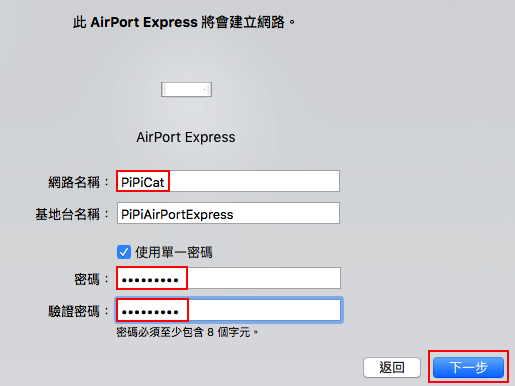
A. PiPiCat
    1. 設備: Apple AirPort
    2. 設定方式: AirPort 工具程式
    3. 參考: Dives the dragon: AirPort Express

---------------------------------------------------------------------------

B. PiPi
    1. 設備: TOTOLINK N200RE
    2. 設定方式: http://192.168.2.1/
    3. 參考:


---------------------------------------------------------------------------

C. (不使用)iHome3F
    1. 設備: ASUS Router RT-AC1200 (品質不佳, 超過一年後, 很不穩定)
    2. 設定方式: http://192.168.50.1/
    3. 參考:


---------------------------------------------------------------------------

D. iHome4F
    1. 設備: TOTOLINK AC5 (只有 3 個區網連接埠, 所以要再接一個 HUB)
    2. 設定方式: http://10.1.1.1/login/login.cgi
    3. 參考:


---------------------------------------------------------------------------

E. (啟用) iHome3F
    1. 設備: Vigor2110 (韌體已更新: 3.7.3, Update Vigor2110 Firmware)
    2. 設定方式: http://192.168.1.1/
    3. 參考:


   ******************************************************************


---------------------------------------------------------------------------

F. 備註
    1.

2017年1月22日 星期日

讓 Mac Sierra 可以安裝第三方軟體

啟用功能: (開啟允許「任何來源」選項)
終端機程式 > sudo spctl --master-disable

停用功能: (關閉「任何來源」選項)
終端機程式 > sudo spctl --master-enable

2017年1月14日 星期六

colorFixed For Diablo & HellFire

參考來源:
1. Colors for Diablo are messed up!

   建議作業系統: Windows 7 x86

1. Create a new notepad file in the same directory as your Hellfire.exe executable

2. Enter the exact following and save it as a .bat filetype :

@echo off
taskkill /f /im explorer.exe
hellfire.exe
pause
start explorer.exe
exit


3. Run the .bat file to play Diablo: Hellfire and never again do you need to use the Hellfire.exe executable. What this .bat file will do is completely end explorer.exe (all folder will close as well, of course) and open up a black window followed by the launch of Diablo: Hellfire. Leave that black window open in the background, it's harmless. When you are done playing Diablo: Hellfire, exit the game, return to the black window and hit enter to automatically re-launch explorer.exe and carry on with your life.